LeanIX Enterprise Architecture
Build and transform technology landscapes to support evolving business strategies and operationalize innovation.
Learn moreDiscover, manage, and govern AI agents across the organization
SAP LeanIX Customers
A growing list of industry leaders and organizations of all sizes who trust in SAP LeanIX
See Full ListMaximize market potential through a partner program offering LeanIX solutions tailored to your business model.
Learn moreTake your capabilities to the next level and arm yourself with the knowledge you need
See all resourcesAn enterprise architecture meta model defines the objects, attributes, and relationships used to describe an organization’s architecture.
Enterprise architecture only becomes useful when people describe the business and IT landscape in a consistent way. Without that structure, teams use different terms, model different levels of detail, and struggle to connect strategy, applications, data, and technology.
This is where the enterprise architecture meta model comes in. It gives enterprise architects a common structure for documenting the organization and analyzing change. It also supports governance by making architecture data easier to compare, maintain, and reuse across teams.
This page explains what an enterprise architecture meta model is, which parts it usually includes, how relationships work, and how organizations use it in practice.
An enterprise architecture meta model is the underlying structure used to describe an enterprise architecture. It defines:
which object types exist
which attributes can be captured for each object
which relationships can exist between them
In simple terms, it is the schema behind enterprise architecture work.
For example, an organization may decide to track business capabilities, applications, interfaces, data objects, and IT components.
The meta model defines those object types and the allowed links between them, such as which applications support which capabilities or which technologies support which applications.
The meta model does not describe the enterprise itself. Instead, it defines how the enterprise can be described in a consistent way.
An enterprise architecture model shows part of the organization, such as an application landscape, capability map, or target architecture.
An enterprise architecture meta model defines the rules behind that model. It sets the categories, fields, and relationships that make the model consistent.
A simple way to think about it is:
the EA model is the actual map
the EA meta model is the structure behind the map
Governance depends on consistent architecture data. If teams classify systems differently or document relationships in different ways, architecture reviews become harder, impact analysis becomes weaker, and standards are difficult to enforce.
A clear meta model helps create a shared language across business and IT. It also gives governance teams a more reliable way to assess dependencies, risks, standards, and change impact.
Organizations use an EA meta model to make enterprise architecture usable at scale.
In real environments, this structure usually lives inside an EA tool or another managed repository, where teams can maintain object types, attributes, and relationships consistently over time.
A lightweight version can start in Excel or diagrams, but that approach becomes harder to govern once the landscape grows and dependencies multiply.
At SAP LeanIX, for example, we describe our meta model as the conceptual structure behind architectural elements and relationships, and offers a best-practice starting point that customers can configure to fit their needs.
One reason organizations adopt a meta model is to avoid fragmented documentation. Without a common structure, one team may track applications by vendor and another by business owner. That makes it hard to compare information, keep data clean, or connect business and IT views.
A meta model gives teams a common way to organize architecture data inside the repository they use. That does not mean every company uses the same structure. It means they define one structure that everyone follows, so architecture work is not rebuilt differently in every project. This is especially important when multiple stakeholders contribute to the same EA practice over time.
Enterprise architecture becomes more valuable when the same dataset can support multiple use cases. Leaders may want application rationalization, architects may need impact analysis, and governance teams may need standards and exception reviews. That only works when architecture data is structured consistently.
This is where the meta model plays a practical role. It sets the rules for how architecture objects are described and connected inside the tool or repository.
In practice, this means teams can use the same architecture foundation for reporting, planning, governance, and change work instead of creating a new model for every question.
Organizations also use an EA meta model because governance depends on connected data, not just principles or review boards. Architecture teams need to understand how change moves through the landscape. That is difficult when relationships are tracked informally or not tracked at all.
For example, replacing a core system requires more than knowing that the system exists. Teams also need to know what it supports, what depends on it, and where the change creates risk. A meta model makes that possible by giving the repository enough structure to support traceability and dependency analysis.
Governance is easier to operationalize when architecture data is structured, connected, and maintained in a shared system rather than spread across isolated files.
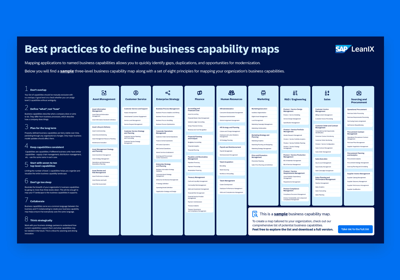
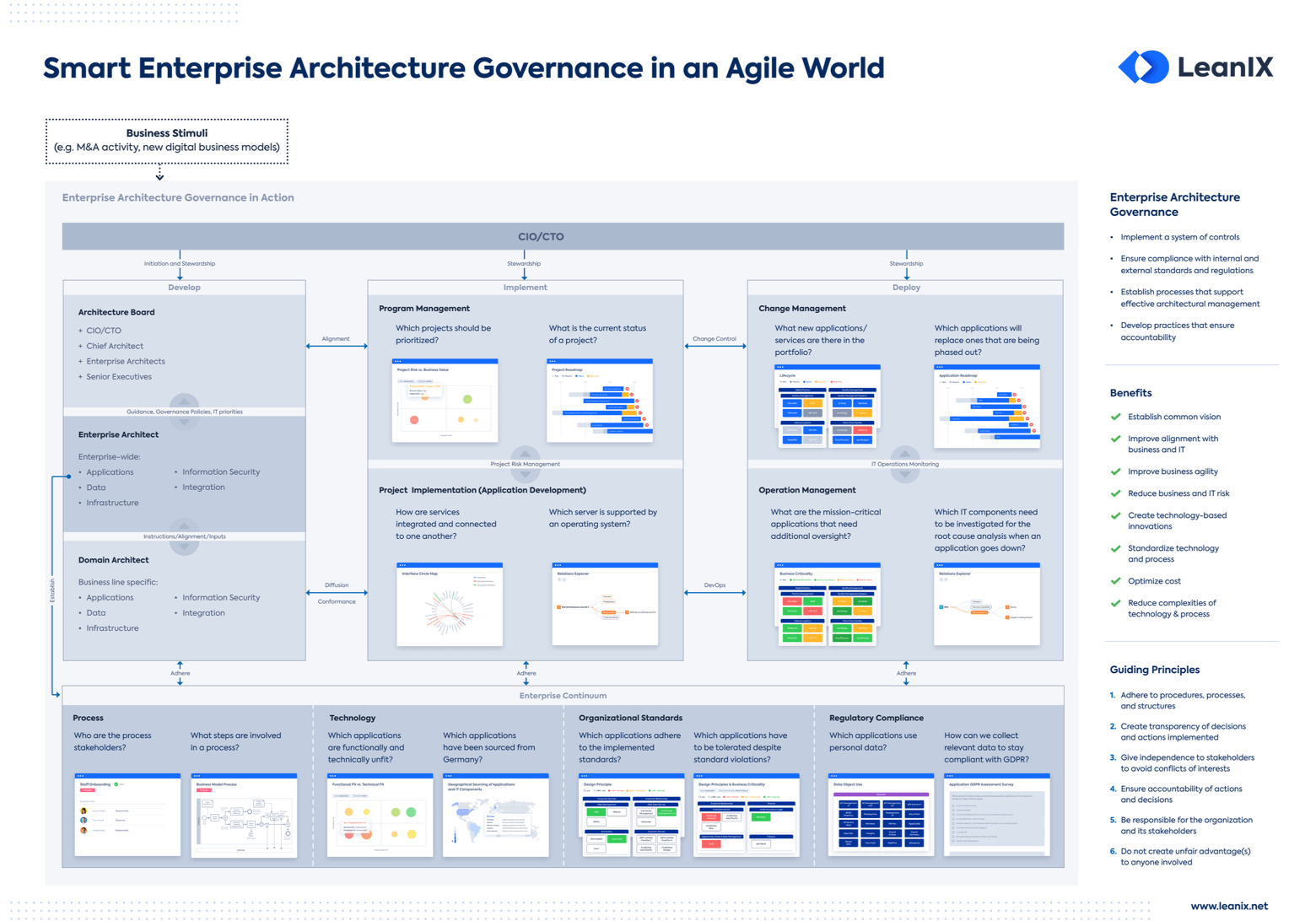
Poster
This poster helps you create the perfect business capability map for your organization with visual capability mapping examples.
Most enterprise architecture meta models include a similar set of core components, even if the labels vary by framework, tool, or company.
In practice, these components are usually maintained in an EA repository, where teams define object types, capture attributes, and connect them through relationships.
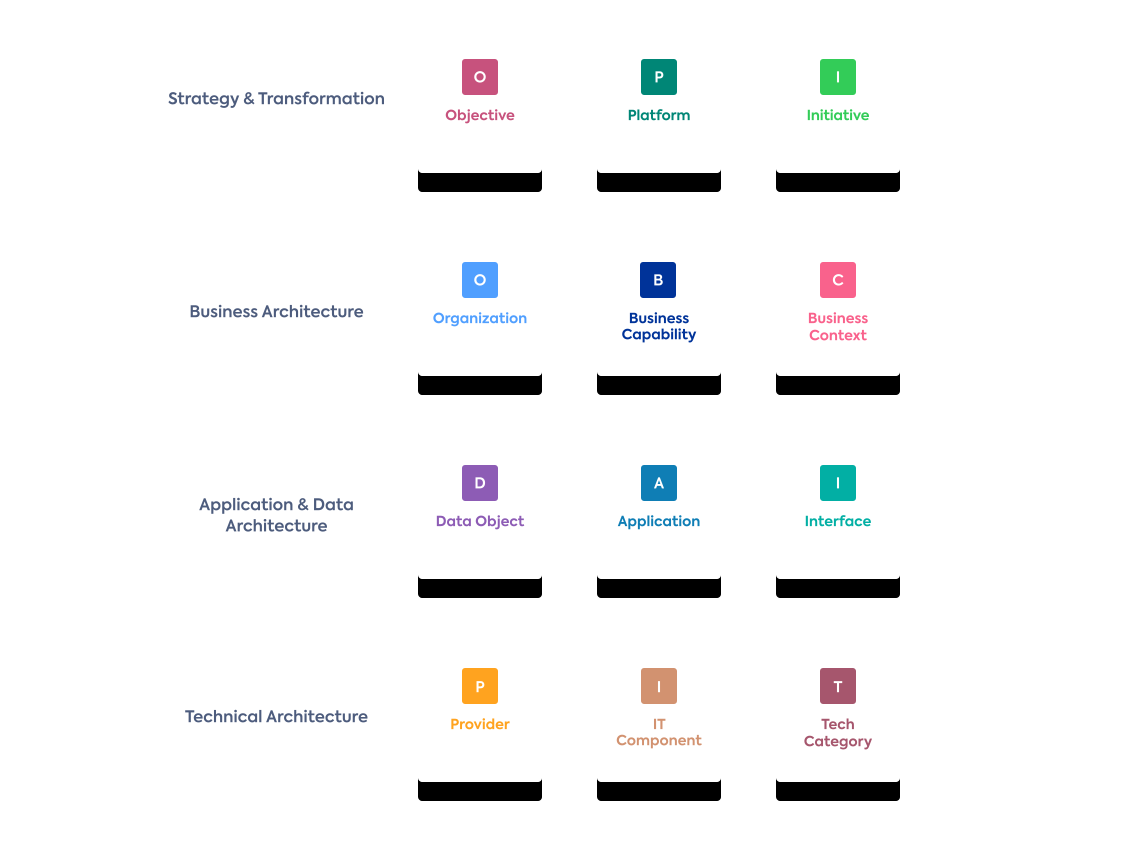
Meta Model example from SAP LeanIX
Together, they describe how the business operates, which technologies support it, and where change creates impact.
Many organizations include a strategy layer so architecture work stays connected to business direction. This part of the meta model explains why change is happening and what the organization is trying to achieve. Without it, enterprise architecture can become a technical inventory with little connection to business priorities.
Common objects in this layer include:
Business objectives — the business outcomes the organization wants to achieve, such as reducing costs or improving customer experience
Strategic priorities — the focus areas that guide decision-making and investment
Principles — the rules or guardrails used to shape architecture decisions
Initiatives — the major change efforts launched to move the business toward its goals
Programs and projects — the specific delivery vehicles used to implement those initiatives
For example, a company that wants to shorten order fulfillment time may link that goal to a transformation initiative, several projects, and the business and IT changes needed to support it.
The business layer describes what the organization does, how it operates, and who is responsible for it. This is one of the most important parts of the meta model because it connects architecture work to business operations rather than only to systems.
Common objects in this layer include:
Business capabilities — what the business needs to be able to do, such as customer onboarding or supplier management
Organizational units — the teams, departments, or functions responsible for business activities
Products and services — the outputs the organization delivers to customers or internal users
Business owners — the people accountable for a capability, process, product, or service
A capability such as customer onboarding may be owned by a business unit and supported by multiple applications. That gives enterprise architecture a way to connect business design with technology planning.
This layer describes the application landscape and how information moves across it. For many organizations, this is the part of enterprise architecture that becomes useful most quickly because it helps teams understand dependencies, duplication, and impact across systems.
Common objects in this layer include:
Applications — the software systems used to support business activities
Application services — the specific functions or services an application provides to users or other systems
Interfaces — the technical connections through which systems exchange information
Integrations — the broader patterns or mechanisms used to connect applications across the landscape
Data objects — the business or technical data entities that move through or are managed by systems
AI agents — software-based agents that use models, tools, and context to perform tasks or support decisions
AI models — the language or machine learning models used by applications or agents to generate outputs or predictions
For example, an order management application may exchange customer data with a CRM, and send financial data to an ERP. Once those relationships are documented, architects can assess the downstream effect of replacing or changing one system.
Many organizations now extend this layer to include AI-specific application objects, especially where AI agents, copilots, or model-based services are becoming part of day-to-day operations.
The technology layer captures the technical foundation behind applications. It helps organizations understand whether their technology base is stable, standardized, and fit for future needs. This layer is also where lifecycle and risk issues often become visible.
Common objects in this layer include:
IT components — the underlying technologies used by applications, such as databases, middleware, or runtime components
Platforms — the shared environments on which applications are built or operated
Vendors and providers — the external companies that supply technology products or services
Hosting environments — where systems run, such as on-premises infrastructure or cloud environments
Lifecycle states — the current status of a technology, such as active, phased out, or end of life
Risk or compliance assessments — information that shows where technologies create exposure, constraints, or governance concerns
MCP servers — protocol-based server components that expose tools, resources, and capabilities to AI applications
Vector stores or model infrastructure — technical services that provide retrieval, context, or runtime support for AI-enabled applications
For example, if several critical applications depend on a database technology that is approaching end of life, that becomes both a governance issue and a transformation priority.
The exact mix of components depends on the framework, tool, and use cases. Most teams start with a core structure and refine it over time as their EA practice matures.
The real value of an enterprise architecture meta model comes from the relationships between objects, not from the objects alone.
A list of applications, capabilities, or technologies can be useful, but it only becomes true enterprise architecture when those elements are connected in a meaningful way.
Meta Model Relationships from SAP LeanIX
One of the most common uses of the meta model is linking business objects to IT objects. This helps teams understand how technology supports business operations and where change will have business impact.
Typical examples include:
a business capability supported by one or more applications
an organizational unit owning an application, or initiative
a strategic initiative affecting specific capabilities, applications, or technologies
These relationships matter because they connect architecture work to business questions.
For example, if a company wants to improve customer onboarding, architects need to know which capabilities are involved and which applications support those capabilities.
Without those links, the repository remains a collection of disconnected records instead of a usable architecture view.
A second important set of relationships sits within the IT landscape itself. This is where teams model how applications connect to each other, what data they exchange, and which technologies support them.
Common examples include:
an application connected to another application through an interface
an application managing or exchanging a data object
an application depending on one or more IT components or platforms
a technology component linked to a vendor, lifecycle state, or standard
This is often the point where enterprise architecture becomes much harder to manage in spreadsheets alone. As the number of systems grows, teams need a structured repository that can maintain these links consistently and show them in different views.
Many organizations now extend the same relationship logic to AI-related architecture objects. These do not replace the core enterprise architecture layers. They usually extend them.
Typical examples include:
an AI agent acting as an application or application component
an AI model used by an AI agent or another application service
an AI application retrieving context from a vector store or other knowledge source
an AI agent calling tools through an MCP server
an MCP server exposing access to documents, databases, code repositories, or enterprise systems
This is useful because AI systems are rarely stand-alone. They depend on models, runtime services, enterprise data, policies, and external tools. The Model Context Protocol defines servers as providers of tools, resources, and prompts for AI clients, which makes MCP servers fit for the technology and integration side of the meta model.
Relationships become especially important when architects need to assess impact, risk, and change.
An application may look unimportant in isolation, but its role can change completely when it supports a critical capability, feeds several downstream systems, depends on aging technology, or acts as the control point for an AI-enabled workflow.
This is why EA meta model interdependencies matter in governance. Interdependencies help teams answer questions such as:
Which business capabilities would be affected if this system fails?
Which interfaces need to be reviewed before replacing an application?
Which technologies create risk across multiple business services?
Which AI agents depend on a model, tool, or MCP server that is not governed well enough?
Which architecture standards or exceptions affect the broader landscape?
For a first-time reader, the simplest way to think about it is this: the objects tell you what exists, while the relationships tell you how the enterprise works.
This is what turns a meta model into a practical foundation for governance, impact analysis, and architecture decision-making.

Success Kit
Everything you need for quick time-to-value and long-term success through EA.
There is no single enterprise architecture meta model that fits every organization. Most teams use one of three broad approaches: a framework-based meta model, a tool-based meta model, or a custom meta model built around their own business needs. In practice, these approaches often overlap.
A team may start with a framework, implement it in a tool, and then adapt it over time as the architecture practice matures.
SAP LeanIX, for example, provides a configurable best-practice meta model, while TOGAF provides a content metamodel as part of its broader EA framework.
A framework-based meta model starts from an established EA framework or standard. The goal is to use a recognized structure for architecture work instead of defining everything from scratch.
Common examples include:
TOGAF® — includes a content metamodel within its architecture content approach
ArchiMate — provides a modeling language for describing and visualizing relationships across business, application, and technology domains
Industry-specific or internal standards — some organizations adapt recognized structures to meet regulatory, operational, or sector needs
This approach can help early-stage EA teams because it gives them a clear starting point and a shared vocabulary. It also makes it easier to align architecture work with recognized practices. At the same time, most organizations do not copy a framework exactly as written. They usually adapt it to fit their scope, maturity, and governance needs.
A tool-based meta model starts from the structure provided by an EA platform or repository. In this approach, the tool gives the team a practical starting point for modeling objects, attributes, and relationships, often based on common customer patterns and use cases.
This is how many organizations work in practice. They do not build a meta model as a theoretical document first. They start with the structure available in the tool, then configure and extend it to match how they want to run enterprise architecture.
Examples include:
Best-practice base models provided by EA tools
Configurable object and relationship types managed inside the repository
Optional extensions that support specific use cases such as strategy, risk, or transformation planning
SAP LeanIX fits this category because it offers a fully configurable, best-practice meta model, modeling guidelines, and optional extensions for specific enterprise architecture management use cases.
A custom meta model is designed around the questions the organization wants enterprise architecture to answer. This approach is common in more mature teams or in organizations with unique structures, governance requirements, or transformation priorities.
A custom structure may include standard EA objects such as capabilities, applications, and technologies, but define them in a way that reflects the company’s language, operating model, or decision process.
Some organizations also extend the model to include newer object types such as AI agents, model services, or integration components like MCP servers when those become relevant to architecture governance.
This approach offers more flexibility, but it also requires stronger governance. If the structure becomes too detailed or inconsistent, the repository can become harder to use rather than more valuable.
That is why many custom meta models still borrow from frameworks and tool best practices instead of starting from a blank page.
For most organizations, the best choice is not fully framework-based, fully tool-based, or fully custom. It is usually a combination.
A practical pattern looks like this:
start with a proven structure from a framework or EA tool
use that structure inside a repository where relationships can be maintained properly
adapt the model over time to fit the business, governance process, and use cases
That balance helps teams avoid two common problems: copying a framework too rigidly or inventing a structure that is too complex to maintain.
For a first-time EA practice, a best-practice tool model or a lightweight framework-based model is often the most realistic starting point. More mature teams can then refine it as their architecture questions become more specific.
Designing an enterprise architecture meta model starts with a simple question: what decisions should this model support?
The goal is not to document everything. It is to create a structure that helps the organization understand its landscape, govern change, and answer architecture questions in a consistent way.
A meta model should be shaped by the questions the business and architecture team need to answer. That usually includes questions such as:
Which applications support a critical business capability?
Which technologies are creating risk?
What would be affected by replacing a core system?
Which initiatives are changing the landscape?
Where are we adding AI, and what does it depend on?
When teams start by collecting data without defining the decisions behind it, the model often becomes bloated and hard to maintain. Starting with decisions keeps the structure focused and practical.
Most teams do not need a large model on day one. A better starting point is a small set of core object types that reflect the business and IT landscape clearly.
A practical first version often includes:
business capabilities
applications
interfaces
data objects
IT components
initiatives
From there, the model can expand based on real needs. Some organizations later add products, services, risks, standards, providers, AI agents, or MCP servers. That works best when the core structure is already stable.
Many teams focus first on fields and object details. In practice, relationships are often more important. A meta model becomes useful when it shows how business, applications, data, technology, and change are connected.
For example, it is often more valuable to know:
which application supports which capability
which interface connects which systems
which technology supports which application
which AI agent depends on which model or server
than to capture many descriptive fields that do not support analysis.
A good design process usually defines a few important relationships first, then adds attributes that help governance, ownership, lifecycle tracking, or reporting.
The model should be understandable beyond the architecture team. That means using names and categories that business and IT stakeholders can recognize. If the structure is too technical or too abstract, adoption becomes harder.
For example, a capability name such as customer onboarding is easier for stakeholders to use than an internal label that only the EA team understands. The same applies to applications, processes, and ownership definitions. A shared vocabulary makes governance much easier later.
A meta model can be sketched in a workshop, diagram, or spreadsheet, but it becomes harder to manage there over time. Once the landscape grows, teams usually need an EA tool or structured repository to maintain object types, relationships, ownership, and lifecycle data consistently.
This is especially true when the model needs to support impact analysis, governance workflows, reporting, or roadmaps. In practice, the repository is what turns the meta model from a design idea into an operating structure for enterprise architecture.
A good meta model is not fixed forever. It should evolve as the business changes, architecture maturity grows, and new use cases appear. That may include adding new relationship types, refining object definitions, or extending the model to cover areas such as AI governance or technology risk.
The key is to expand with purpose. Every addition should support a real question, governance need, or planning use case. If not, it usually adds complexity without adding much value.
White Paper
Three areas where Enterprise Architecture Management adds value—and the nine most commonly solved used cases.
A meta model is only useful when people can apply it consistently in day-to-day architecture work. The biggest challenges usually appear when the structure becomes too complex, too unclear, or too disconnected from real governance decisions.
Modeling too much too early: Teams often try to capture every possible object, field, and relationship from the start. That usually creates a structure that is hard to maintain.
What helps: Start with the core objects and relationships needed for the first few use cases, then expand only when there is a clear reason.
Weak or inconsistent relationships: Some teams document applications, capabilities, or technologies, but do not define the links between them clearly enough. That limits impact analysis and governance value.
What helps: Define the most important relationship types early and make sure teams use them in the same way.
Mixing concepts at different levels: A model becomes confusing when high-level business concepts and low-level technical details are treated as if they belong in the same category.
What helps: Keep object types clearly separated and use consistent definitions for each layer of the architecture.
No clear ownership or update rules: Even a well-designed meta model loses value if nobody is responsible for keeping it accurate.
What helps: Assign ownership for key objects and relationships, and define simple update and review rules.
Treating the meta model as documentation only: If the model is not used in architecture reviews, planning, or change decisions, it usually becomes outdated.
What helps: Tie the model to real governance processes so it supports decisions, not just documentation.
A simple example makes the meta model easier to understand. Imagine a bank wants to reduce the time it takes to onboard a new customer. That business goal becomes the starting point for the architecture team.
The organization may model the following objects in its repository:
Goal — reduce onboarding time by 30%
Business capability — customer onboarding
Applications — CRM, onboarding portal, workflow tool, core banking system
Data objects — customer record, identity data, risk profile
Interfaces — connections between the onboarding portal, CRM, and core banking system
IT components — database, integration middleware, authentication service
Initiative — onboarding transformation program
On their own, these are just separate records. The value comes from linking them together.
In this example:
the goal is supported by the initiative
the initiative changes the customer onboarding capability
the capability is supported by multiple applications
the applications exchange data objects through interfaces
some of those applications depend on aging IT components
This gives the architecture team a much clearer view of the landscape. They can see which systems support the business objective, where dependencies sit, and which technologies may slow down the change.
This kind of model helps governance teams answer practical questions.
For example:
Which applications are most critical to customer onboarding?
Which interfaces need review before a system is changed?
Where do technical risks affect a business-critical capability?
The same logic can also be extended to AI. If the bank adds an AI agent to support onboarding, the repository can show which model it uses, which internal tools it accesses, and whether it depends on an MCP server or another runtime component.
That makes AI part of the wider enterprise architecture instead of a separate, ungoverned layer.
This is why the enterprise architecture meta model matters in practice. It helps teams move from isolated system records to a connected view of how business change, applications, data, technology, and governance fit together.
Understand EA governance and its frameworks
Learn the principles of EA governance
Leverage the LeanIX EAM to drive governance for agile environments
Is TOGAF the same as an enterprise architecture meta model?
Is ArchiMate the same as an enterprise architecture meta model?
Can AI agents and MCP servers be part of an EA meta model?