Partner Program

Maximize market potential through a partner program offering LeanIX solutions tailored to your business model.

Learn more
EA Fundamentals

MCP Server for Enterprise Architecture

An MCP server for EA is a standardized gateway that connects AI agents and external tools to an organization's EA data, giving them governed, role-based access to application records, architecture decisions, and application relationships without requiring custom integrations.

Enterprise Architecture Fundamentals MCP Server for Enterprise Architecture

Enterprise architecture holds the data that AI agents need to reason about the technology landscape: application inventories, lifecycle status, business capability mappings, and the dependencies between them.

Until recently, connecting any AI tool to that data required a custom integration built and maintained by the EA team or an engineering group. The Model Context Protocol changes that.


What is an MCP server in enterprise architecture?

An MCP server for enterprise architecture is a secure, standardized gateway that exposes EA repository data to AI agents and external tools through the Model Context Protocol, an open standard that defines how AI systems request and retrieve information from external data sources. It replaces one-off custom connectors with a consistent interface that any compliant AI agent can use.

Before MCP, every AI integration was a project. An organization that wanted its internal copilot to answer questions from the EA repository, or a custom agent to run data quality checks against application inventory records, needed a custom API connector built, tested, and maintained for each tool. The integration was fragile, expensive, and scoped to one specific use case. When the AI tool changed, the connector had to be rebuilt.

The MCP server replaces that pattern with a standard. An EA repository that publishes an MCP server can be accessed by any MCP-compliant AI agent without additional integration work. The same gateway that enables Microsoft Copilot Studio to query the application inventory also works with Claude Desktop, Cline, or a custom LLM, because all of them speak the same protocol.

For enterprise architects, the practical implication is that the EA repository stops being a closed system that only the in-platform assistant can reach. It becomes a governed data source that any authorized AI tool in the organization can query, reason over, and act on, using the same access controls that govern human users.


What it exposes?

An MCP server for enterprise architecture exposes the structured content of the EA repository as three types of interface: resources, tools, and prompts.

Resources are the data objects an agent can read: application inventory records, technology component data, business capability maps, architecture decisions, and the relationships between them. These are the same structured records an architect queries directly in an EA tool, now available to any compliant AI agent with the appropriate access rights.

Tools are the operations an agent can perform: querying the inventory by attribute or relationship, updating application records, creating new entries, and submitting architecture decisions for review. The range of write operations depends on the governance settings applied to the MCP server and the permissions of the authenticated account.

Prompts are reusable instructions and guardrails that control what agents see, generate, and execute. Prompts are how organizations operationalize governance at the agent level: an EA team can define that agents responding to lifecycle questions must surface data completeness caveats, or that agents updating application records must flag changes above a defined scope for human review before committing them.

Together, these three layers make the MCP server more than a read-only data pipe. It is a governed interface through which AI agents can both retrieve EA knowledge and take actions within the repository, bounded by the guardrails the EA team establishes.

Guide

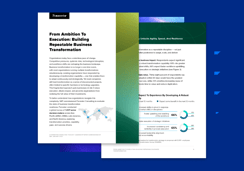
Apply AI governance best practices now, with the power of EA

Enterprise Architecture done right accelerates your AI time-to-value

Apply AI governance best practices now, with the power of EA


What agents can do with EA data?

When AI agents have governed access to EA data through the MCP server, the range of tasks they can perform extends well beyond what any single in-platform assistant handles.

Query and analysis. An agent connected to the EA repository can answer inventory questions in natural language: which applications are scheduled for replacement before a given year, which application records are missing business owner information, which technology components are approaching end of support. These queries run against the current state of the repository, not against the agent's training data, so answers reflect the organization's actual landscape.

Compliance and governance. An agent can review application records against a connected policy document, generate a compliance survey pre-populated with the entries that require remediation, and distribute it to the relevant application owners. The value is not that an agent can draft a survey; it is that the agent can scope the survey correctly by querying the repository first and including only the records where compliance gaps actually exist.

Data quality. Agents can monitor portfolio-wide data completeness, identify application records where required attributes are missing, and initiate enrichment workflows. A data quality agent running against the repository surfaces the same issues a manual audit would find, but continuously rather than in periodic campaigns.

Cross-system intelligence. Agents operating in external tools, including Copilot Studio workflows, governance bots in Teams channels, and custom LLMs handling IT questions, can answer architecture questions and surface decisions from the repository. This gives non-EA users governed access to EA knowledge without requiring them to navigate the EA platform directly.

Governance and access controls

The MCP server does not bypass the EA governance model; it extends it to AI agents operating outside the platform.

Access through the MCP server is role-based. An AI agent can only retrieve and act on data that the authenticated user it operates on behalf of is permitted to see and edit. An agent running in the context of a read-only user cannot write to the repository. An agent running in the context of an application owner can update the application records assigned to that owner, and nothing else. There are no elevated rights at the agent level.

Three controls define what agents can do:

  • Access scope: which resources the MCP server exposes and which are kept internal to the EA platform

  • Permission inheritance: agents act with the permissions of the user or service account under which they are authorized, not with elevated rights

  • Prompt guardrails: reusable instructions that define what agents generate, how they surface uncertainty, and when they escalate to human review

Governed AI access to EA data is the architectural complement to governed human access. The same principles that define who can edit an application record or approve an architecture decision apply when an AI agent performs the same actions. This consistency matters because it means the EA team does not need a separate governance framework for AI agent access; the existing model covers both.


MCP server in SAP LeanIX

SAP LeanIX publishes an MCP server that exposes workspace EA data to compliant external agents. It supports Microsoft Copilot Studio, Cline, and Claude Desktop out of the box, as well as custom agents built on standard MCP client libraries.

The MCP server complements the in-workspace EA Assistant rather than replacing it. The EA Assistant handles tasks inside the SAP LeanIX interface: querying the repository through a chat interface, enriching fact sheets, running data quality tasks.

The MCP server is the interface for tasks that require EA data to flow into external AI environments: a Copilot Studio workflow referencing the application portfolio, a governance bot answering architecture questions in a Teams channel, or a custom agent running analysis that combines EA data with information from other sources.

SAP LeanIX also represents MCP servers as architecture objects in the EA meta-model, allowing EA teams to document and govern the MCP servers operating in their organization alongside the applications and AI agents they connect to.

This is part of the broader AI capabilities in SAP LeanIX, which tracks AI agents, MCP servers, and traditional applications in the same inventory and governance framework.

Free Report

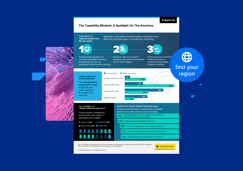
SAP LeanIX Agentic AI Survey 2026

Get your free copy

EN-TN-SAP-LeanIX-Agentic-AI-Survey-2026-780x546
check

98 %of companies have deployed or plan to deploy AI agents — but only 17% have visibility into agent performance or conformance

check

48 % have no clear roles or responsibilities for AI agents

check

63 % say EAs should lead AI agent governance — yet only 34% are actually involved today

FAQs

What is the difference between the EA Assistant and the MCP server?

The EA Assistant is the in-workspace AI interface, accessed through a chat interface inside SAP LeanIX, designed for architects working directly in the platform. The MCP server is an open interface for external AI tools: it allows agents operating outside SAP LeanIX to access EA data through the Model Context Protocol. Both are grounded in the same repository data, but they serve different interaction patterns. Use the EA Assistant for in-platform tasks; use the MCP server when EA data needs to be accessible to AI tools built or operated outside the platform.
Any AI agent that implements the Model Context Protocol as a client can connect to the EA MCP server. Off-the-shelf examples include Microsoft Copilot Studio, Cline, and Claude Desktop. Custom agents built on standard MCP client libraries also connect without modification, as long as they authenticate with a valid user or service account that has the appropriate access rights.
Yes, within the permissions of the authenticated account. Agents can update record fields, create entries, and submit decisions for review, subject to the governance settings the EA team applies. Actions outside the authenticated user's permission scope are blocked. Write operations can also be constrained further by prompt guardrails that require human approval above a defined scope of change.
No. The MCP server is configured at the platform level and does not require custom connector development. Connecting a compliant AI agent requires authentication credentials and an MCP client library, both standard for any tool that supports the protocol.
EN-TN-SAP-LeanIX-Agentic-AI-Survey-2026-780x546

Report

SAP LeanIX Agentic AI Survey 2026

International study reveals high adoption of AI agents – but gaps in effective management

Access Now